Simplifying International Tax Compliance with Gemini
As a U.S. citizen living in India, I’ve experienced firsthand the complexity of navigating tax obligations across multiple countries. The process is often overwhelming due to:
These pain points inspired me to create Expat Tax Navigator — a GenAI-powered assistant designed to demystify international tax compliance for U.S. citizens abroad.
This blog showcases the following core GenAI capabilities:
The treaty between the U.S. and India is a 40+ page legal document. Tax documents often hide crucial info like:
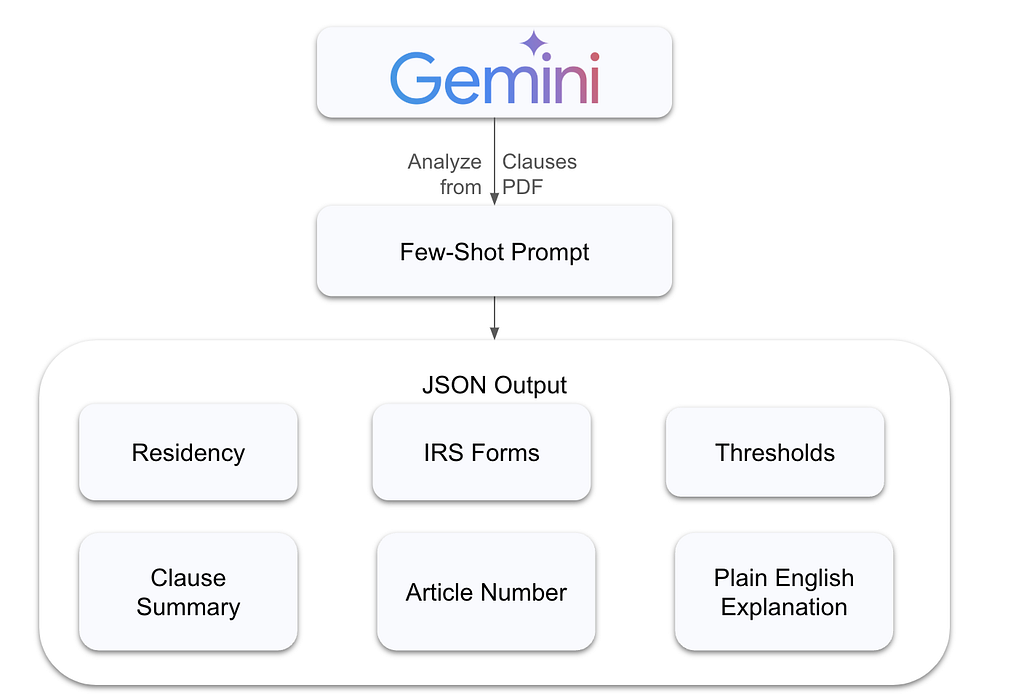
Instead of just asking the model to summarize the treaty, we guide it in extracting structured information from a dense legal clause using explicit JSON formatting. It showcases how GenAI can go beyond summarization to perform precise information extraction from real-world documents.
prompt = f"""
You are a tax assistant. Extract structured information about foreign earned income from this treaty clause.

Return only a valid JSON object with the following keys:
- "residency": (short explanation)
- "irs_forms": (list of form names)
- "thresholds": (list of thresholds/tests)
- "article_number": (e.g., "Article 4")
- "clause_summary": (1-2 sentence summary)
- "plain_english_explanation": (short explanation for a general audience)

Respond with only the JSON object. Do not include any commentary or Markdown formatting.
"""

clause_response = model.generate_content(full_pdf_text + "\n\n" + prompt)
display(Markdown(clause_response.text))
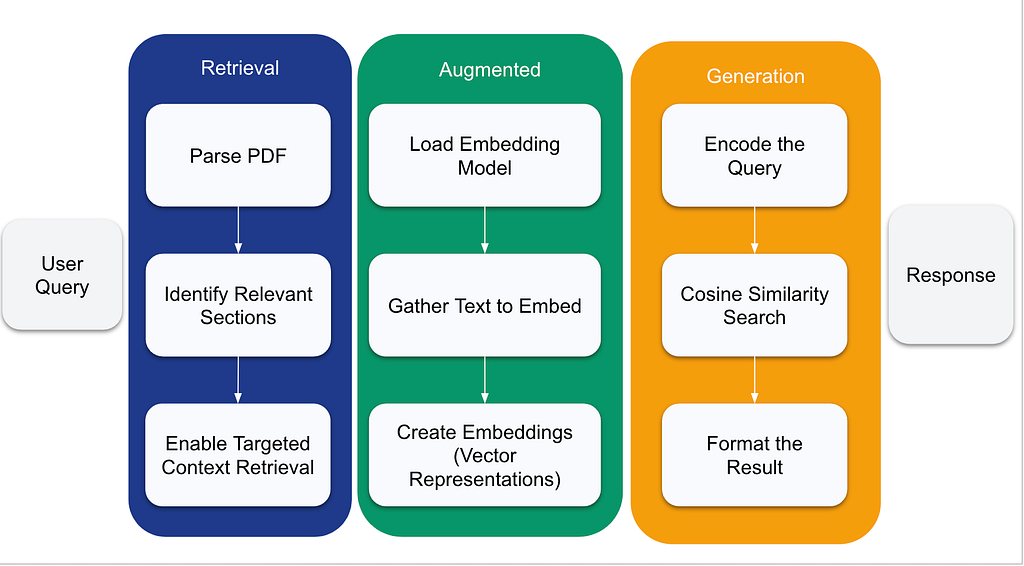
First, we extract key sections (like articles) from the tax treaty document. This forms our knowledge base.
Next, each section is converted into a vector (embedding), capturing the essence of its content. These embeddings help us compare and match user queries to specific sections.
When a user asks a question, we find the most relevant treaty sections by comparing their embeddings to the query. The top matches are then returned to guide the model’s answer generation.
The relevant sections generate an answer based on real content, ensuring the response is accurate and context-aware.
Most real-world questions don’t need the entire document — just the correct part. RAG helps GenAI focus on the most relevant sections, reducing hallucinations and improving precision. It’s like giving the model a flashlight in a dark room instead of expecting it to memorize the blueprint.
# Retrieval: Function to handle the PDF extraction and processing
def extract_treaty_sections(pdf_text):
    """
    Extract key sections from the tax treaty document
    """
    # Implement section parsing logic here
    sections = {}

    # Simple regex or string matching to identify article boundaries
    # This is just an example approach
    import re
    article_pattern = re.compile(r'ARTICLE (\d+)[:\s]+([^\n]+)')
    matches = article_pattern.finditer(pdf_text)

    for match in matches:
        article_num = match.group(1)
        article_title = match.group(2).strip()
        # Find the content of this article (could be improved)
        sections[f"Article {article_num}"] = {
            "title": article_title,
            "start_pos": match.start()
        }

    # Add end positions
    article_keys = list(sections.keys())
    for i in range(len(article_keys) - 1):
        sections[article_keys[i]]["end_pos"] = sections[article_keys[i+1]]["start_pos"]
        sections[article_keys[i]]["content"] = pdf_text[sections[article_keys[i]]["start_pos"]:sections[article_keys[i]]["end_pos"]]

    return sections
# Augmented: Function to create embeddings for treaty sections
def create_treaty_embeddings(treaty_sections):
    model = SentenceTransformer('all-MiniLM-L6-v2')

    section_texts = []
    section_ids = []

    for section_id, section_data in treaty_sections.items():
        if "content" in section_data:
            section_texts.append(section_data["content"])
            section_ids.append(section_id)

    # Create embeddings
    embeddings = model.encode(section_texts)

    return embeddings, section_ids, section_texts
# Generation: Function to find relevant sections
def find_relevant_sections(query, embeddings, section_ids, section_texts, top_k=3):
    model = SentenceTransformer('all-MiniLM-L6-v2')
    query_embedding = model.encode([query])

    # Calculate similarities
    similarities = cosine_similarity(query_embedding, embeddings)[0]

    # Get top k results
    top_indices = np.argsort(similarities)[-top_k:][::-1]

    results = []
    for idx in top_indices:
        results.append({
            "section_id": section_ids[idx],
            "similarity": similarities[idx],
            "text": section_texts[idx][:500] + "..." # Truncate for display
        })

    return results
The goal is to:
json_prompt = """
Extract key clauses from the U.S.-India Tax Treaty.
Return output as JSON with this format:
[
  {"article": "Article 25", "title": "Relief from Double Taxation", "summary": "..."},
  ...
]
Include 3-5 most important ones for U.S. expats.
"""

json_response = model.generate_content(full_pdf_text + "\n\n" + json_prompt)
pprint.pprint(json_response.text)
While powerful, the current implementation has several limitations:
The Expat Tax Navigator showcases the real-world potential of GenAI in simplifying high-stakes, knowledge-heavy tasks — like international tax compliance. By integrating capabilities such as:
…we’ve built a system that doesn’t just answer questions — it makes complex regulations understandable and approachable.
While this tool does not replace professional tax advice, it empowers expats to ask thoughtful questions, understand treaty terms, and feel more confident in their tax responsibilities. It’s a step toward democratizing access to expert knowledge.
As someone who has spent hours Googling IRS clauses and second-guessing tax decisions, I built this tool not just as a project — but as something I wish existed earlier.
If you’re also an expat wrestling with tax compliance or curious about building with GenAI + RAG, I’d love your feedback!
This project was created as part of the Kaggle’s Gen AI Intensive Course Capstone 2025Q1. It is for educational purposes only and should not replace professional tax advice.
Disclaimer: This project is a personal initiative not affiliated with or endorsed by my employer.
All views, opinions, and content shared here are solely my own.
This work was completed outside company hours and used no internal tools or data.
<hr><p>🇺🇸 Expat Tax Navigator was originally published in Google Cloud - Community on Medium, where people are continuing the conversation by highlighting and responding to this story.</p>