Building Secure and Modular Systems with Google ADK, Vertex AI, and Cloud-Native Tooling (MCP, BigQuery, LangChain)
It was July 29, 2022. I was on a flight to Chicago, excited to join a corporate bank’s data and analytics team, yet overwhelmed by the prospect of my first time living alone in a new country. The cultural shift was immense, but the biggest hurdles were logistical: finding an apartment and cooking a healthy, vegetarian meal in a culture where red meat is common.
I realized the struggle wasn’t just mine. Every major life change — from relocation to lifestyle change — comes with chaos. This is why I created LifeNest as part of Google’s “Patchamomma” initiative: a specialized AI Agent solution designed to organize and simplify these life transitions, starting with my personal relocation pain points.
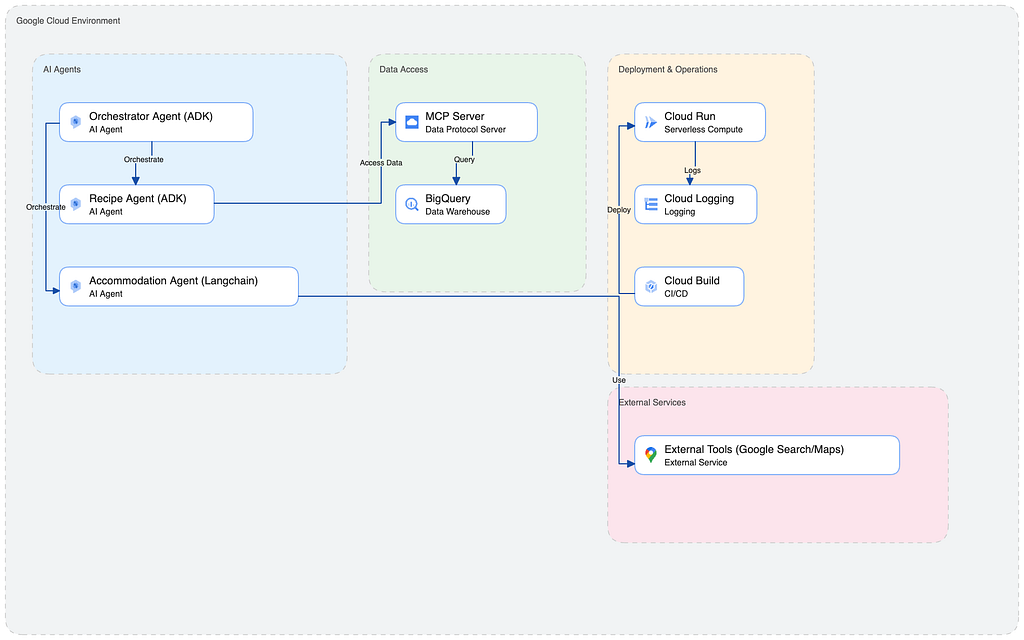
LifeNest is built on a modular, Agent-to-Agent (A2A) architecture using the Google Agent Development Kit (ADK). Think of it as a small, specialized consulting firm where three experts collaborate:
This setup is crucial for scalability — we can add more specialist agents (e.g., a “Budgeting Agent”) without rewriting the core system.
My Recipe Agent needs to search through my stored recipes. While ADK has a BigQuery tool, I chose the Model Context Protocol (MCP) route for superior modularity and extensibility.
To tackle my Chicago relocation challenges, the Accommodation Agent has three powerful tools, demonstrating how agents manage complex real-world data:
Developing this modular toolset showcases the core skills required to build robust, API-connected agents.
Before diving into the core technology choices, let’s look at the result of these choices in action. The screenshot below shows the LifeNest Orchestrator handling a single, complex user request: “What is a good immunity-boosting smoothie recipe and what are the pros and cons of Presidential Towers in Chicago?”
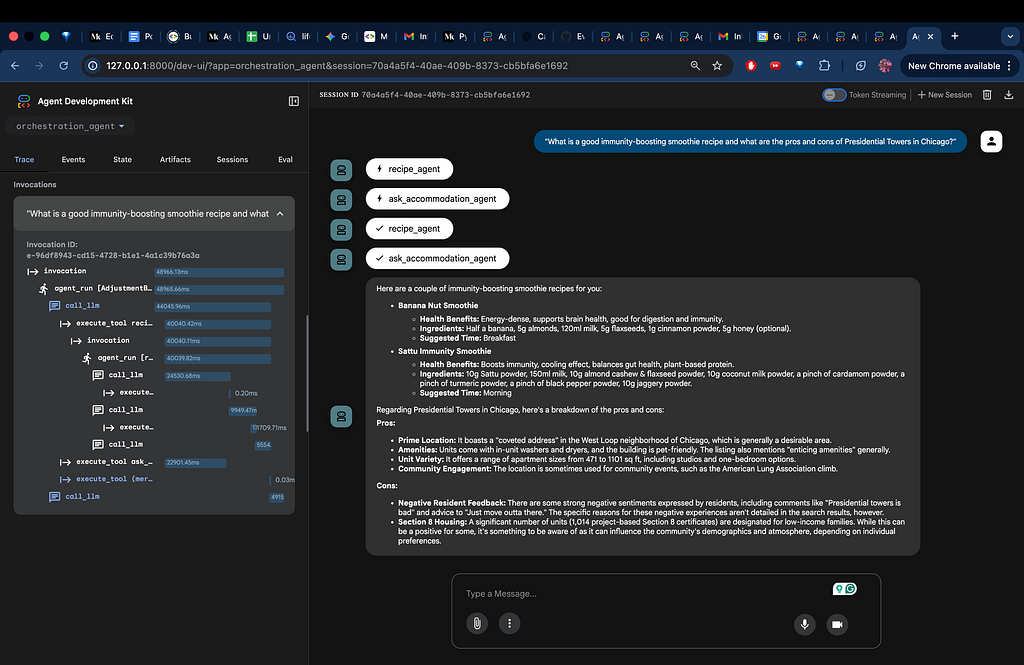
The pane on the right shows the sequence of Agent-to-Agent (A2A) Invocations, which is the system’s “thought process.” Notice the sequence: recipe_agent, ask_accommodation_agent, recipe_agent, ask_accommodation_agent. This repeating pattern is a sign of intelligent collaborative reasoning.
The Invocations pane on the left shows the precise, step-by-step execution trace:
This complexity — solving two major problems with multiple specialized tools in a single user request — is only possible because of the Core Technology Decisions we made, which we will now explore.
To make LifeNest intelligent and reliable, I had to choose the right foundational technology. This is where the Agent Development Kit (ADK) and the selection of the correct AI backend come into play.
The Agent Development Kit (ADK) is the framework that allows us to build and manage our agents. You can think of it as the construction manual and the scaffolding:
The intelligence behind every agent comes from a Large Language Model (LLM), often called a Foundational Model. When I initialized my agents using the ADK, I had to make two key choices (as shown in the screenshot):
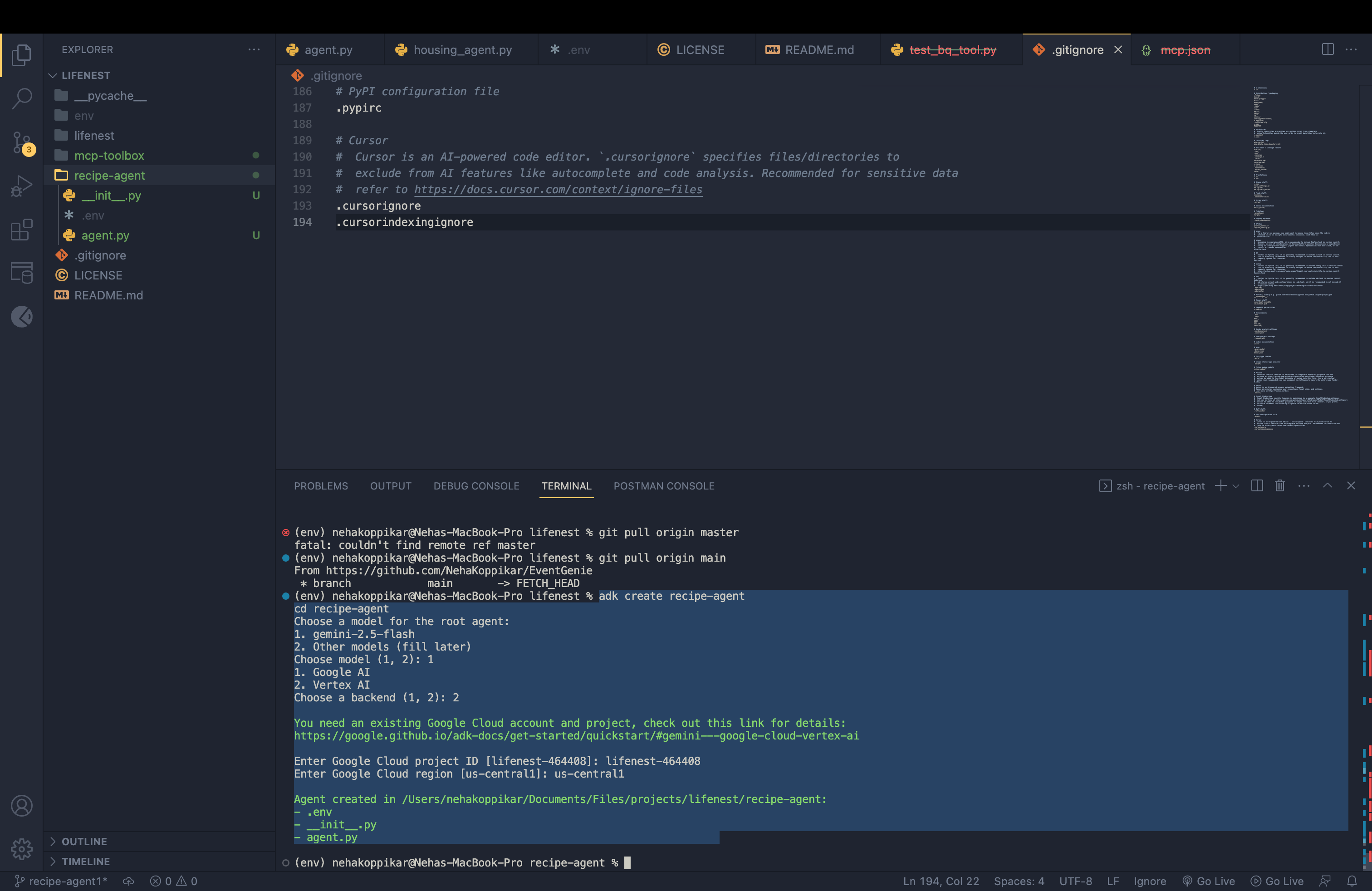
Choosing Vertex AI over the public Google AI backend was an essential architectural decision for building a robust, enterprise-grade application like LifeNest. This choice is critical for professional projects and demonstrates a strong understanding of security and scale:
The true test of a modular design is deployment. I’m proud to share that the local setup of LifeNest works flawlessly, with all three agents communicating and using their tools as designed! However, scaling up to the cloud revealed significant challenges, proving that development skills must be paired with robust DevOps knowledge.
The initial deployment of the Agent Engine itself was a success — the container was live.
The Problem: Despite a “successful” deployment notification, I could not test or interact with the deployed agent engine in any meaningful way. It was a black box. Without a clear interface or immediate feedback, it was impossible to confirm if the internal agent logic had loaded correctly or if the system was truly ready for production traffic.
The Lesson: A deployment status of “success” doesn’t guarantee a functional service. It forced me to rely entirely on Cloud Logging (see below) to confirm the agent’s startup process and health.
As I mentioned, the MCP server is currently not deployed. This meant that testing the connection from my local machine to the expected cloud endpoint failed.
The Problem: My local ADK server received a 403 Forbidden error when trying to fetch tools from the secure cloud URL.
The Fix: Environment Variable Toggle. I solved this by creating a simple environment variable, MCP_ENV, to switch the agent's connection URL between the local development server (http://127.0.0.1:5001) and the deployed server. This is a crucial professional technique for enabling continuous local development while a cloud service is being debugged.
Deploying agents and their tools requires defining exactly how they should be packaged and run in the cloud.
These standard files define the runtime environment. The requirements.txt lists all necessary Python libraries (like requests and langchain), and the Dockerfile provides the precise, repeatable instructions for building the server's operating system environment (the container).
server.py is the entry point that initializes the agent application.
run.sh is a shell script that often sets up environment variables or executes server.py with the correct arguments. It acts as the final instruction set for "start the application now."
Understanding and configuring these files for both the Orchestrator and the MCP server was a significant challenge, but essential for mastering containerized deployment.
This is a challenge faced at every stage, from configuring local tools to preparing for cloud deployment.
The Problem: The configuration for agent tools and deployment often relies on YAML (YAML Ain’t Markup Language) files. YAML is strictly sensitive to whitespace, indentation, and structure. A single extra space or a misaligned colon can cause the entire configuration to fail, leading to obscure startup or parsing errors.
The Lesson: Mastering the strict formatting of configuration files like YAML is just as important as writing clean code. It’s a key distinction between writing a working program and deploying a working, reliable service.
Building LifeNest has been an intense, rewarding experience that has proven the power of the ADK and modular agent design. My next steps are to successfully resolve the MCP deployment challenge, integrate Voice Intelligence (sentiment analysis), and expand the agent system to support more complex life transitions.
By sharing these real-world challenges — especially the nuances of A2A, MCP, and cloud deployment artifacts — I hope to demonstrate the technical depth and problem-solving skills necessary to build resilient, professional AI solutions.
<hr><p>Architecting Scalable AI: Mastering Multi-Agent Systems with Google ADK was originally published in Google Cloud - Community on Medium, where people are continuing the conversation by highlighting and responding to this story.</p>